DesiHeart - Express AI
An AI-powered augmentative & alternative communications (AAC) app to support neurodiverse users in expressing tone & emotion
Challenge
Design an AI-powered AAC app that not only enables communication, but also brings in accessibility, emotional expression, and personalization, helping users share their voices with authenticity and confidence.
Solution
An AI-powered AAC app that is affordable, simple to navigate, and accessible, enabling non-verbal individuals to express not just words, but their emotions and personality with confidence.
Role
UX Researcher, UX/UI Designer
Tools
Figma
Competitive Analysis
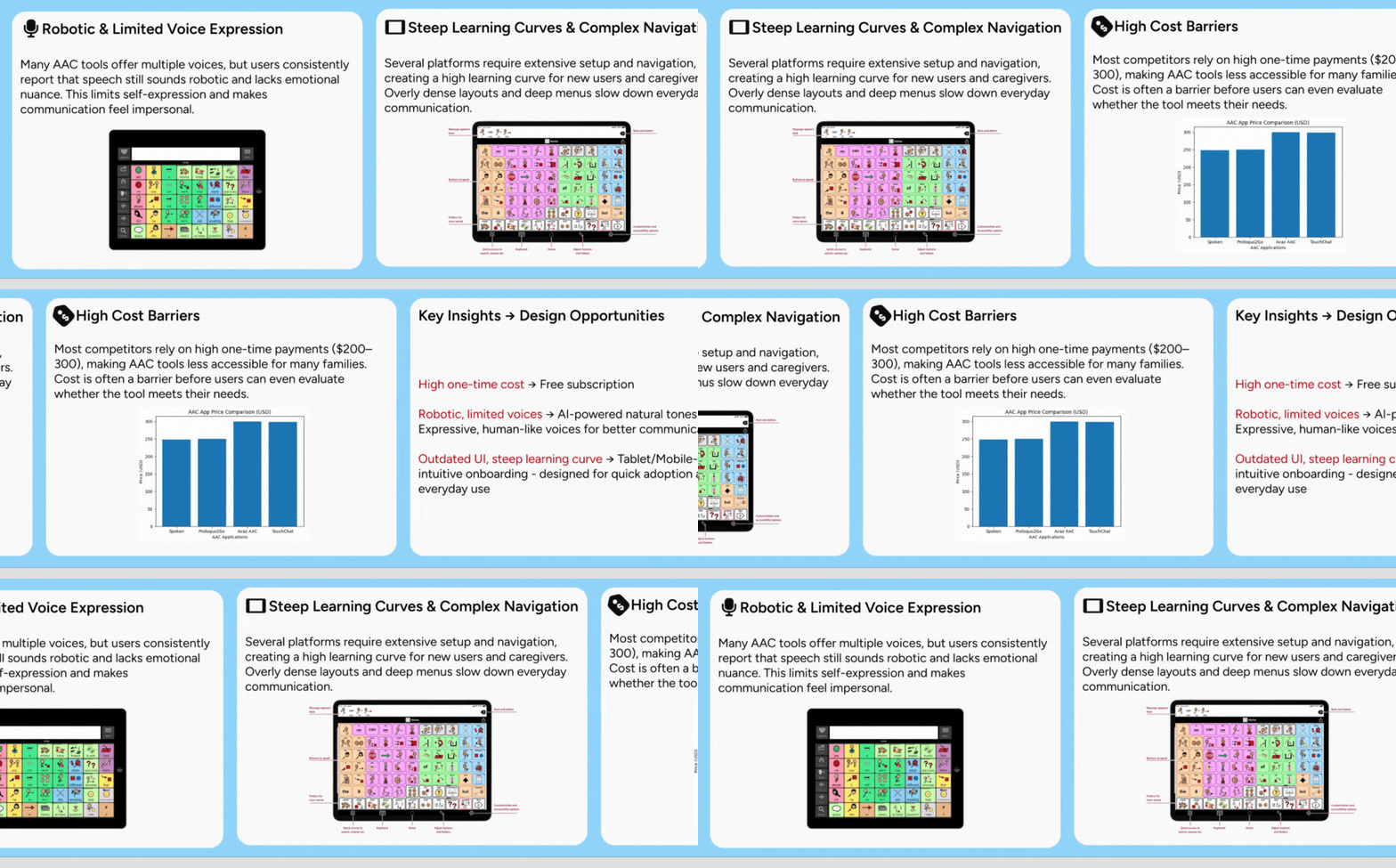
To ensure the design process focuses on genuine user needs, I started with a competitive analysis of leading AAC apps and devices. This evaluation assessed each product's core features, accessibility options, pricing models, and overall usability. Additionally, I examined user reviews and feedback to capture authentic experiences, not just what companies claim, but how users truly feel about these tools.
This comprehensive approach allowed me to identify strengths to learn from and gaps to address. By synthesizing this research, I was able to pinpoint clear opportunities for ExpressAI to stand out, particularly in developing a more intuitive, affordable, and emotionally expressive AAC experience.
Spoken
Variety of voices and accents
Positive reviews on their voice options
Fast predictive text
Incognito mode: allows users to have a convo that won’t affect future predictive text
While improved voices, users still note they sound robotic
Large amount of features behind a pay wall
Text heavy
App does not do well with Voiceover (screen reader)
Proloquo2Go
Multiple languages
Multiple voice options
Symbol-first grid, good for beginners
Customizable buttons with real photos
Scales from basic to advanced
Highly customizable (grid size, buttons, vocab)
Large learning curve on navigating app
Voices still sound robotic, recent updates noting voice to sound breathy affecting voice clarity
TouchChat
Multiple languages
Multiple voice options
Vocabulary customization
Multiple expressive tones
Easy to navigate & tutorial videos available on website
Ability to record your own voice
Large range of button sizes
Large learning curve on navigating app
While improvement on voices recently, voices still sound robotic
Screen reader issues
A lot of scrolling is necessary to find the buttons they want
Avaz
Customizable grids
Multiple voice options
Strong accessibility controls
Ability to choose from pre-programmed boards
Customizable buttons/pictures
Large learning curve on navigating app
Voices still sound robotic
IOS only
No ability to choose tone/emotion of voice
Key Features Analysis
I analyzed leading competitors and documented their common features, pricing models, and standout differentiators. This helped identify both baseline expectations and gaps in the market.
By outlining what competitors offer, I uncovered opportunities for DesiHeart to differentiate, particularly in accessibility, customization, and expressive communication. These insights directly shaped my design decisions and informed our feature priorities.
Average price of competitors:
$200–300
Common Features:
Next-word prediction engine, save commonly used phrases, customize speed & pitch, add custom vocabulary, change icons, autocorrect when typing, multiple vocabulary/language levels, light/dark mode, change grid size, iOS accessibility support.
Unique Accessibility Features:
Hold duration & select on release, head tracking & eye tracking compatibility.
Unique Setting Options:
Block words from predictions, incognito mode, layout customization (reposition navigation bar, hide/show UI elements).
Unique Features:
Scrollable word suggestions with icons, attention button, personalized predictions quiz, handwriting input / canvas, “Frozen Row” with frequently used vocabulary and expressive tones.
Opportunities
Gap
1. High pricing in Proloquo2Go & similar AAC
2. Robotic, limited voices (except Avaz Tones)
3. Poor, outdated UI & steep learning curve
4. Limited languages (Spoken English-only)
5. Inconsistent accessibility settings
ExpressAI
→
1. Free/Affordable Pricing
2. AI-powered natural, expressive tones
3. Modern, mobile-first design + simplified onboarding
4. Broad multilingual support + easy switching
5. Robust, consistent motor + neurodiverse accommodations
User Flows & IA
Designing the AAC Vocabulary Flow
To create an intuitive and empowering communication experience, I built the vocabulary architecture using evidence-based AAC principles and user-centered research:
Studied leading AAC systems to benchmark category structures, layout patterns, and navigation flows
Analyzed high-frequency core vocabulary lists to ensure essential words for daily communication were always available
Consulted AAC best practices for motor planning, learnability, and cognitive load to minimize friction for new communicators
Organized words into meaningful semantic categories based on commonly used AAC taxonomies
Balanced core and fringe vocabulary, core providing linguistic power and fringe offering personalization and specificity
Designed for future scalability so caregivers and clinicians can add more vocabulary as skills progress
Outcome
A structured, scalable vocabulary system that supports:
Rapid communication with high-frequency persistent core
Clear, predictable category navigation
Growth into literacy and advanced expression
Configurability for different communication needs
Vocabulary Flow
To validate efficiency and reduce cognitive load, I mapped out multiple paths a user could take to say the word “bathroom”. Using insights from competitive analysis and user research, I incorporated the idea of AI-driven high-frequency vocabulary to streamline the flow.
Key Highlights
Referenced competitive analysis to identify that leading AAC apps surface frequently used words automatically, shaping the foundation of this optimized flow
Outlined multiple user paths (e.g., tapping through folders, scrolling, typing) to reflect real-world usage patterns and varying levels of motor/visual abilities
Calculated total clicks per path, clearly showing where friction existed and where AI-powered shortcuts could meaningfully reduce interaction cost
Integrated an AI-driven high-frequency row, reducing navigation time and making urgent or daily-use words accessible in 1–2 taps
Aligned with user research themes, where participants emphasized the need for speed, reduced scrolling, and fewer buttons to communicate essential needs
This flow allowed the team to identify where to prioritize optimizations and guided the design of a more accessible, efficient interaction model for users with diverse communication needs.
Validating Efficiency Through User Flow
User Flow To Say ‘Bathroom’
This user flow was one part of a larger set of flows developed collaboratively by our design team. I was responsible for creating and refining the “Bathroom” communication flow, while coordinating with other designers to ensure consistency across interaction patterns, information hierarchy, and accessibility considerations.
How I led the systemization of our visual + interaction design:
Consolidated team research assets ➝ organized competitive analysis, user insights, initial wireframes, and moodboards into a unified Figma file for easier collaboration
Defined a multi-page design file structure ➝ ensured every teammate could quickly locate artifacts and build upon previous work
Created a scalable design system rooted in the product’s mood board ➝ applied consistent visual language across new and evolving screens
Developed an accessible color palette ➝ WCAG-AA contrast compliant for all text and interaction states
Collaborated with team to build reusable component library ➝ primary/secondary buttons, nav elements, tile styles, sliders, badges, inputs, toggles
Established spacing and grid standards ➝ responsive tablet-first layout with predictable alignment and readability
Selected and standardized iconography ➝ prioritized clarity, visual balance, and AAC-familiar metaphors
Defined typographic hierarchy ➝ balanced readability with expressive personality
Aligned AAC vocabulary tile colors with FITZ color standards ➝ supports grammar learning through consistent color coding
Outcome
A cohesive, accessible, and scalable design system that speeds up collaboration, unifies UI patterns, and supports the cognitive needs of AAC users
Design System Creation & UI Foundations
Accessible type hierarchy for fast scanning and readability
Figtree selected for legibility across tablet environments and varying visual abilities
**minimum 20px body text for readability on tablets
Unified iconography for clarity and quick recognition
Designed to reduce cognitive load and ensure universal comprehension through simplified shapes and consistent stroke styling
**Icons adhere to accessible touch targets (≥ 44px), maintain consistent stroke weight, and use color only to indicate urgency or critical action
Reusable components aligned for consistency and rapid iteration
Standardized UI elements, including buttons, tiles, toggles, input controls, and sliders, ensure predictable interaction patterns across the app
**tap targets meet WCAG 2.5.5
Grammar-educational color system supporting motor planning and language development.
Vocabulary tiles use Modified Fitzgerald Key mappings to help users recognize word functions (pronouns, verbs, nouns, etc.)
Vocabulary Color System (FITZ AAC Key)
**reinforces syntax learning through consistent visual cues
Prototyping & Iteration
Home Screen Evolution
We started with an initial home screen designed by another teammate. From there, I led a round of UX improvements to ensure the interface supported motor-efficient access, reduced error risk, and aligned with our design system standards.
Key refinements I introduced:
Integrated standardized UI components ➝ Improved visual consistency and readability
Introduced a persistent side navigation ➝ Quick access to core actions like:
• Add new word
• Settings
• Back navigation
• Search
Ensuring users can find essential tools without changing contextEnhanced icon placement and tap target size ➝ Easier access for users with limited fine motor control
These updates resulted in two streamlined variations, which we put into A/B testing to evaluate:
Efficiency of navigation
Cognitive load and visual clarity
Initial Concept
Prototype created by teammate before UI standardization
Concept A
Minimalist version of UI components - no outline
Concept B
Outlined UI components
After completing the home screen refinements, I collaborated with another designer to improve the Add a New Word experience, a critical workflow allowing users and caregivers to expand vocabulary seamlessly. We built on an existing early-stage flow developed earlier in the project and focused on making it clearer, faster, and more supportive for caregivers.
Key enhancements we introduced:
Refined the step-by-step journey → Reduced friction by simplifying the number of decisions per screen
Ensured clear forward momentum throughout the processAligned interaction patterns with design system standards → Standardized button hierarchy, labels, and iconography
Promoted familiarity across the product experienceStrengthened caregiver guidance → Added instructional text and visual cues to reduce uncertainty
Helped users feel confident when customizing communication contentImproved accessibility considerations → Larger tap targets and streamlined layout for limited motor control
Minimized scrolling and repetitive interactions
These improvements supported a more predictable, user-centric workflow, especially valuable for caregivers managing tasks in complex or time-sensitive environments.
Add A New Word Prototype - Flow Collaboration
Add New Word User Flow
Usability Testing
Before moving into high-fidelity designs, we conducted a moderated usability test using an interactive Figma prototype. I co-planned the study, created the outline and A/B homepage variations, and led the live testing session while a collaborating designer took structured notes. The CEO assisted in recruiting the participant.
Because AAC users can be difficult to recruit (many are minors or medically vulnerable), our first round of testing included one caregiver participant. A subject matter expert familiar with AAC workflows. This allowed us to validate critical flows early and reduce future development risk.
Core flows tested:
Building a sentence (navigation + hierarchy)
Emergency alert flow (high-stakes accessibility task)
Adding and categorizing a new word
Home screen UI preference A/B test (icon clarity)
My role in the session:
Led the moderated task walkthrough and follow-up questions
Guided participant through flows to uncover pain points
Adding and categorizing a new word
Synthesized findings into action items for iteratio
Key Insights & What We Learned
Task
Success
Rating
Task Success Rating Build a sentence
✔ Completed
⭐⭐⭐⭐☆ (4/5)
Add new word
✔ Completed
⭐⭐⭐⭐⭐ (5/5)
Emergency alert
✔ Completed
⭐⭐⭐⭐⭐ (5/5)
“Outlined icons”
Homepage preference
✔ Decision
“This is absolutely fabulous, I love it”
“The interface is looking good, it’s more engaging”
Caregiver responded very positively to emergency flow and overall clarity — “very easy and very nice”
The add word flow was smooth once the entry point was discovered → opportunity for visibility enhancements
Preference for outlined icons in the home screen variation → informs visual system direction
Even with a small sample size, this early testing:
Validated that caregivers could complete tasks successfully
Revealed priority improvements in navigation hierarchy and discoverability
Confirmed strong engagement and user-friendliness for non-verbal communication support
Most importantly: it guided what to fix before investing in development.
Impact
We plan to conduct an additional testing round with 3–5 AAC users and caregivers to validate improvements and accessibility before handoff to engineering.
Future Testing Plan
Final Design → Developer Handoff
After incorporating insights from usability testing, I led the creation of the high-fidelity prototypes in Figma for the core caregiver experience. The goal of this phase was to finalize visual design, accessibility decisions, and interaction patterns for development.
I delivered the following flows:
Caregiver / New User Onboarding
Homepage
Homepage with Child Lock Enabled
Add a New Word Flow
I used Auto Layout, components, and variants to ensure scalability. My focus in this stage was aligning usability learnings with design accessibility standards, making communication fast, clear, and intuitive for caregivers and AAC users.
High-Fidelity Prototype Creation
When moving from mid-fidelity wireframes into final high-fidelity prototypes, my primary focus was creating an onboarding experience that supports caregivers while prioritizing the accessibility needs of AAC users from the very first interaction.
Because onboarding often sets the foundation for long-term usability, I leveraged insights from earlier user flows and competitive analysis of existing AAC apps to ensure that this setup flow was not only clear and scalable but also inclusive.
Key Improvements & Design Rationale
Accessibility-first customization: I expanded the number of accessibility settings available during initial setup based on research into best practices across AAC products. Introducing options like dwell time, voice selection, and communication preferences early on allows the caregiver to tailor the experience to the user’s motor and cognitive needs right away, reducing friction once they begin communicating.
Caregiver clarity & ease of onboarding: I streamlined the flow so caregivers always understand what they’re setting up and why it matters. Clear guidance, chunked steps, and strong visual hierarchy help reduce cognitive load, especially in emotionally sensitive contexts where caregivers are eager to help their loved one communicate as quickly as possible.
Strengthening visual accessibility with playful approachability: I introduced a soft background color behind modal windows to improve contrast and maintain focus, while also bringing warmth and personality to a process that can otherwise feel clinical. This balances accessibility requirements with a tone that feels empowering and inviting, especially for younger users.
Flow alignment and scalability: The final screens closely follow the user flow we established early in the process, ensuring consistency in navigation and interaction expectations. Components were built with Auto Layout and variants to ensure future updates could be made quickly as the product evolves.
Caregiver/New User Onboarding - Design Decisions
Previous Mid-Fi Concept (Designed by Teammate)
→
Hi-fi Prototype
Add a New Word — High-Fidelity Refinements
For the final design of the “Add a New Word” flow, my focus was on strengthening clarity and accessibility while maintaining the strong usability of the existing interaction pattern.
Key Enhancements
Improved visual hierarchy for primary actions to reduce scanning time and mis-taps
Added a darkened overlay behind category selection to reinforce focus and prevent accidental navigation
Updated button styles and spacing to align with WCAG tap-target requirements
Applied a more polished visual system that supports readability and cognitive ease
Retained the core flow structure, as it performed well in testing and was validated through AAC competitive research
These refinements make word customization fast, accessible, and cognitively supportive, a critical requirement for diverse AAC users.
Add a New Word Hi-fi User Flow